| Vorheriges Thema anzeigen :: Nächstes Thema anzeigen |
| Autor |
Nachricht |
Attila 


Anmeldungsdatum: 24.02.2007
Beiträge: 58002
Expire: 2025-11-18
|
 Verfasst am: Do März 25, 2010 5:55 pm Titel: Minolta Dual Scan II |
|
Verfasst am: Do März 25, 2010 5:55 pm Titel: Minolta Dual Scan II |
|
|
Attila wrote:
I won on this scanner on low price. I expect better result than from my Epson V500. Any experience ? |
|
| Nach oben |
|
 |
Katastrofo
Anmeldungsdatum: 26.02.2007
Beiträge: 10405
Wohnort: USA
Expire: 2013-11-19
|
Verfasst am: Do März 25, 2010 9:17 pm Titel: |
|
Verfasst am: Do März 25, 2010 9:17 pm Titel: |
|
|
Katastrofo wrote:
I'll try it with some slide scans I recently did with my flatbed for comparison.
a little blurb:
http://www.ask.com/bar?q=minolta+scan+dual+ii&page=1&qsrc=121&dm=all&ab=0&u=http%3A%2F%2Fwww.scantips.com%2Fdual2.html&sg=wG8Sm%2BWlC9OGD5PbJ0jFIZZm1hmIPAlraOqNx28misI%3D&tsp=1269551115479
If I like this a lot, maybe you won't have any experience, maybe next
time. Just kiddin'!  |
|
| Nach oben |
|
|
Attila
Anmeldungsdatum: 24.02.2007
Beiträge: 58002
Expire: 2025-11-18
|
Verfasst am: Do März 25, 2010 10:10 pm Titel: |
|
Verfasst am: Do März 25, 2010 10:10 pm Titel: |
|
|
Attila wrote:
|
|
| Nach oben |
|
|
paperinik

Anmeldungsdatum: 11.01.2009
Beiträge: 100
Wohnort: Adro, italy
|
Verfasst am: Do März 25, 2010 11:33 pm Titel: |
|
Verfasst am: Do März 25, 2010 11:33 pm Titel: |
|
|
paperinik wrote:
I also own V500 + scandual II. Compared to V500 it's a better option for 35mm scanning.
The only limit is that it's a little bit soft, but a kind of softness easy to fix with gimp tools.
Here is some sample:
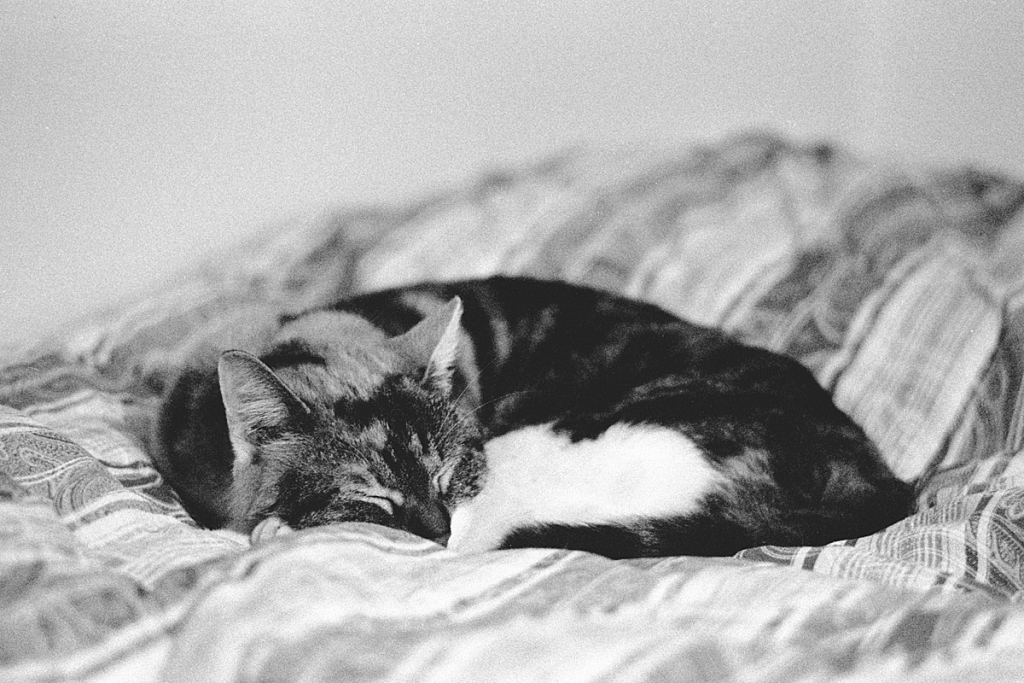
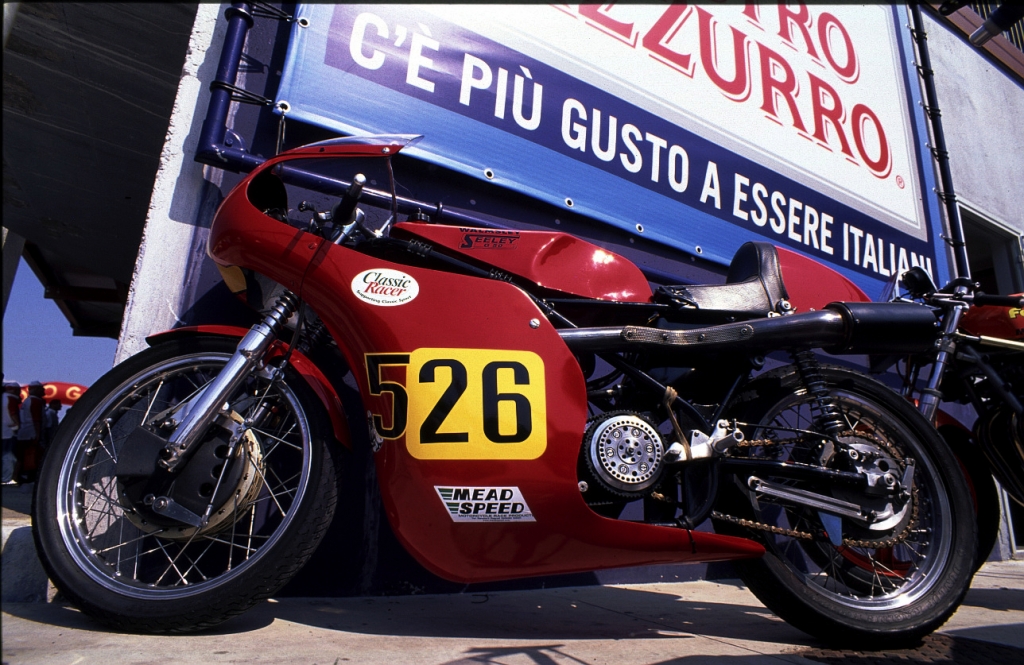

BW shot with fuji 1600, slides thanks to Velvia Power© |
|
| Nach oben |
|
|
Attila
Anmeldungsdatum: 24.02.2007
Beiträge: 58002
Expire: 2025-11-18
|
Verfasst am: Do März 25, 2010 11:51 pm Titel: |
|
Verfasst am: Do März 25, 2010 11:51 pm Titel: |
|
|
Attila wrote:
Many thanks! |
|
| Nach oben |
|
|
aoleg


Anmeldungsdatum: 22.02.2008
Beiträge: 1387
Wohnort: Berlin, DE
|
Verfasst am: Fr März 26, 2010 9:24 am Titel: |
|
Verfasst am: Fr März 26, 2010 9:24 am Titel: |
|
|
aoleg wrote:
I have this scanner, too. It's an old model and is not perfect, but OK if bought inexpensively. First, you *might* have trouble connecting it via a USB port to your PC. I mean, it may occasionally hang in the middle of scanning. This can happen if your motherboard has NVIDIA nForce chipset. Solution: an add-on PCI USB2 card. Another thing, this scanner does not have an infrared dust/scratch removal technology; a PITA when scanning color film (won't matter for black and white as the tech doesn't work with silver-based films). Other than that, I used Vuescan instead of the bundled crapware.
The scanner itself is *very* sharp. At least the scratches it scans could not appear any sharper. Any softness other users experience may be user error (during shooting, developing film, or scanning).
_________________
List of lenses |
|
| Nach oben |
|
|
Attila
Anmeldungsdatum: 24.02.2007
Beiträge: 58002
Expire: 2025-11-18
|
Verfasst am: Fr März 26, 2010 10:45 am Titel: |
|
Verfasst am: Fr März 26, 2010 10:45 am Titel: |
|
|
Attila wrote:
Many thanks for good advices! |
|
| Nach oben |
|
|
paperinik
Anmeldungsdatum: 11.01.2009
Beiträge: 100
Wohnort: Adro, italy
|
Verfasst am: So März 28, 2010 10:04 am Titel: |
|
Verfasst am: So März 28, 2010 10:04 am Titel: |
|
|
paperinik wrote:
| aoleg hat folgendes geschrieben:: |
The scanner itself is *very* sharp. At least the scratches it scans could not appear any sharper. Any softness other users experience may be user error (during shooting, developing film, or scanning). |
 Mmmh if so I think that mine might have some focus issue, since in my case the scratch also aren't super-sharp. No matter how much I try with manual focus.
Consider that I've also tried with a test photo, taking a picture if my monitor with a sonnar 200/2,8, well stopped down to f:8 with fuji velvia. When I project to the wall it's easy to see every single dot, while is not possible with the scans. Consider the photo of the motorcycle posted above, it's killer sharp even projected at 150 cm wide, while scanned you are waching already the maximum magnification possible without losing some detail.
So every time, when I edit the image I've to choose if keep sharp edges or the fine texture in the shadows, thats too bad.
Can someone post some sample got with the scandual II?
Thanks |
|
| Nach oben |
|
|
aoleg
Anmeldungsdatum: 22.02.2008
Beiträge: 1387
Wohnort: Berlin, DE
|
Verfasst am: Mo März 29, 2010 11:23 pm Titel: |
|
Verfasst am: Mo März 29, 2010 11:23 pm Titel: |
|
|
aoleg wrote:
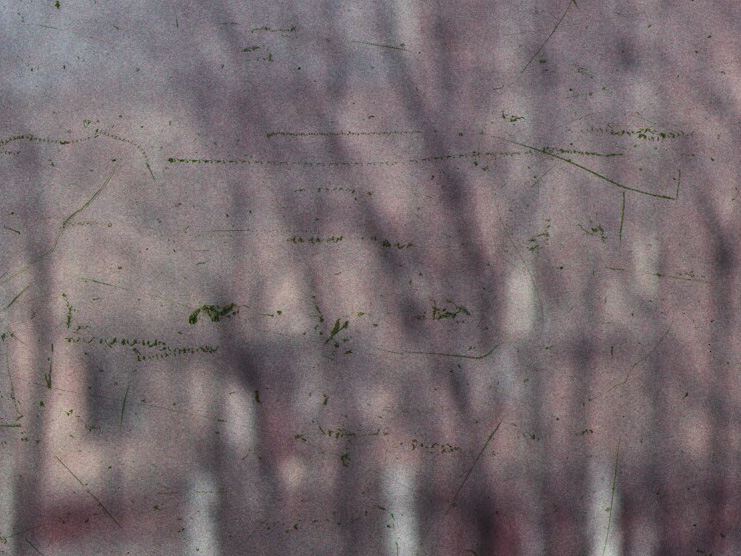
Posting these 100% crops of full-resolution scans. The pictures themselves aren't sharp (slightly misfocused pictures shot with Helios-44-2 on old Soviet films hardly ever produce stunning sharpness), but look at the scratches 

_________________
List of lenses |
|
| Nach oben |
|
|
paperinik
Anmeldungsdatum: 11.01.2009
Beiträge: 100
Wohnort: Adro, italy
|
Verfasst am: Mi März 31, 2010 8:29 pm Titel: |
|
Verfasst am: Mi März 31, 2010 8:29 pm Titel: |
|
|
paperinik wrote:
Mmmh no, my scanner can't do that.
Do you think that is time to open it an clean something? |
|
| Nach oben |
|
|
Excalibur

Anmeldungsdatum: 19.07.2009
Beiträge: 5018
Wohnort: UK
Expire: 2014-04-21
|
Verfasst am: Mi März 31, 2010 10:25 pm Titel: |
|
Verfasst am: Mi März 31, 2010 10:25 pm Titel: |
|
|
Excalibur wrote:
Dunno if this is useful:-
http://largeformatphotography.info/scan-comparison/
_________________
Canon A1, AV1, T70 & T90, EOS 300 and EOS300v, Chinon CE and CP-7M. Contax 139, Fuji STX-2, Konica Autoreflex TC, FS-1, FT-1, Minolta X-700, X-300, XD-11, SRT101b, Nikon EM, FM, F4, F90X, Olympus OM2, Pentax S3, Spotmatic, Pentax ME super, Praktica TL 5B, & BC1, , Ricoh KR10super, Yashica T5D, Bronica Etrs, Mamiya RB67 pro AND drum roll:- a Sony Nex 3
.........past gear Tele Rolleiflex and Rollei SL66.
Many lenses from good to excellent. |
|
| Nach oben |
|
|
Schnauzer

Anmeldungsdatum: 09.04.2008
Beiträge: 2155
Wohnort: Maine, USA
Expire: 2012-03-08
|
Verfasst am: Do Apr 01, 2010 12:41 am Titel: |
|
Verfasst am: Do Apr 01, 2010 12:41 am Titel: |
|
|
Schnauzer wrote:
Will it work with windows vista?
_________________
Ron |
|
| Nach oben |
|
|
IANUS

Anmeldungsdatum: 14.10.2008
Beiträge: 276
Wohnort: Germany
|
Verfasst am: Do Apr 01, 2010 8:42 am Titel: |
|
Verfasst am: Do Apr 01, 2010 8:42 am Titel: |
|
|
IANUS wrote:
| Zitat: |
| Will it work with windows vista? |
If you have Vuescan it should since it uses its own scanner driver.
I have a Minolta Scan Elite 5400 which is a newer model but there are no supported minolta drivers for Vista or Win 7.
Anyway with Vuescan the minolta scanner works with Windows 7 without problems. I even managed to get an old Canon 2700F Scsi scanner to work with Win 7. |
|
| Nach oben |
|
|
aoleg
Anmeldungsdatum: 22.02.2008
Beiträge: 1387
Wohnort: Berlin, DE
|
Verfasst am: Do Apr 01, 2010 9:55 am Titel: |
|
Verfasst am: Do Apr 01, 2010 9:55 am Titel: |
|
|
aoleg wrote:
| paperinik hat folgendes geschrieben:: |
Mmmh no, my scanner can't do that.
Do you think that is time to open it an clean something? |
I don't think you can make it better. Worse, maybe, but not better. I would try Vuescan and focusing before every frame, but that's about all you can do.
_________________
List of lenses |
|
| Nach oben |
|
|
Schnauzer
Anmeldungsdatum: 09.04.2008
Beiträge: 2155
Wohnort: Maine, USA
Expire: 2012-03-08
|
Verfasst am: Do Apr 01, 2010 11:43 am Titel: |
|
Verfasst am: Do Apr 01, 2010 11:43 am Titel: |
|
|
Schnauzer wrote:
| IANUS hat folgendes geschrieben:: |
| Zitat: |
| Will it work with windows vista? |
If you have Vuescan it should since it uses its own scanner driver.
I have a Minolta Scan Elite 5400 which is a newer model but there are no supported minolta drivers for Vista or Win 7.
Anyway with Vuescan the minolta scanner works with Windows 7 without problems. I even managed to get an old Canon 2700F Scsi scanner to work with Win 7. |
Thanks. I never thought of that.
_________________
Ron |
|
| Nach oben |
|
|
yinyangbt

Anmeldungsdatum: 08.10.2010
Beiträge: 1973
Wohnort: Romania
Expire: 2012-12-27
|
Verfasst am: So Dez 12, 2010 10:43 am Titel: |
|
Verfasst am: So Dez 12, 2010 10:43 am Titel: |
|
|
yinyangbt wrote:
WEll , hello , Attila, any updates ?
I am curious, being myself in the process of aquirind a III model
_________________
Cheers , Teo
http://photo.net/photodb/member-photos?user_id=5778915 |
|
| Nach oben |
|
|
Attila
Anmeldungsdatum: 24.02.2007
Beiträge: 58002
Expire: 2025-11-18
|
Verfasst am: Mo Dez 13, 2010 7:24 pm Titel: |
|
Verfasst am: Mo Dez 13, 2010 7:24 pm Titel: |
|
|
Attila wrote:
I did use a few times I prefer Epson V500, it has better software than Minolta have it. Epson V500 faster it is scan 12 frames at same time. Overall I like Epson better so I am selling Dual Scan now. If you use Vuescan and adjust it frame by frame Dual Scan can be better I think. |
|
| Nach oben |
|
|
ludoo

Anmeldungsdatum: 18.09.2009
Beiträge: 1397
Wohnort: Milan, Italy
Expire: 2011-12-05
|
Verfasst am: Mo Dez 13, 2010 8:13 pm Titel: |
|
Verfasst am: Mo Dez 13, 2010 8:13 pm Titel: |
|
|
ludoo wrote:
I have the same scanner, and recently posted a comparison of the same negative scanned with a Plustek 7400, an Epson 4490, and the ScanDual II. The ScanDual works very well with VueScan, and while it's slightly softer than the Plustek, it's much sharper than the Epson, and a light touch of USM will make scans really sharp.
Here are the images I posted in the other thread, the order is Plustek/Minolta/Epson.
Full frame


100% crop, no USM


100% crop, USM in Gimp (Plustek and MInolta 1.5/1/3, Epson 2/1.5/3)


_________________
My galleries
Digital: Samsung EX-1
Past Digital: Samsung NX10, Sigma SD9, Sigma SD10, SD14, DP2, Pentax *istD, Kx, Fuji S2 Pro, Canon 5D
Analog: packfilm Polaroids, 6x9 Kodak folders, Pentacon Taxona half-frame, Fujica ST605n, Walz Envoy, Olympus 35 S-II, Olympus Wide S
Past Analog: Polaroid 600se, Polaroid 110B, Canon IIF, various fixed-lens and Russian rangefinders, ...
Past Lenses: Nikkor 24/2.8, Nikkor SC 50/1.4, Nikkor 50/2, Nikkor H 85/1.8, Nikkor P 105/2.5, Nikkor Q 135/3.5, Fujinon 100/2.8, Fujinon EBC 100/2.8, Fujinon EBC 135/3.5, Fujinon EBC 200/4.5, Mamiya SX 135/2.8, CZJ Flektogon 35/2.4, CZJ Pancolar 50/1.8 zebra, CZJ Sonnar 135/3.5, ...
altroformato
|
|
| Nach oben |
|
|
yinyangbt
Anmeldungsdatum: 08.10.2010
Beiträge: 1973
Wohnort: Romania
Expire: 2012-12-27
|
Verfasst am: Di Dez 14, 2010 12:26 pm Titel: |
|
Verfasst am: Di Dez 14, 2010 12:26 pm Titel: |
|
|
yinyangbt wrote:
Thenk you for the replies.
I just won a Dual scan III on Ebay , I am waiting it to come in a week ,maybe. I know the software is kinda crap ,but plan to give it a try.If it doesn't fit , I'll go VueScan or maybe Silverfast
_________________
Cheers , Teo
http://photo.net/photodb/member-photos?user_id=5778915 |
|
| Nach oben |
|
|
ludoo
Anmeldungsdatum: 18.09.2009
Beiträge: 1397
Wohnort: Milan, Italy
Expire: 2011-12-05
|
Verfasst am: Di Dez 14, 2010 12:43 pm Titel: |
|
Verfasst am: Di Dez 14, 2010 12:43 pm Titel: |
|
|
ludoo wrote:
VueScan is very good and not too expensive, especially the non-pro version.
_________________
My galleries
Digital: Samsung EX-1
Past Digital: Samsung NX10, Sigma SD9, Sigma SD10, SD14, DP2, Pentax *istD, Kx, Fuji S2 Pro, Canon 5D
Analog: packfilm Polaroids, 6x9 Kodak folders, Pentacon Taxona half-frame, Fujica ST605n, Walz Envoy, Olympus 35 S-II, Olympus Wide S
Past Analog: Polaroid 600se, Polaroid 110B, Canon IIF, various fixed-lens and Russian rangefinders, ...
Past Lenses: Nikkor 24/2.8, Nikkor SC 50/1.4, Nikkor 50/2, Nikkor H 85/1.8, Nikkor P 105/2.5, Nikkor Q 135/3.5, Fujinon 100/2.8, Fujinon EBC 100/2.8, Fujinon EBC 135/3.5, Fujinon EBC 200/4.5, Mamiya SX 135/2.8, CZJ Flektogon 35/2.4, CZJ Pancolar 50/1.8 zebra, CZJ Sonnar 135/3.5, ...
altroformato
|
|
| Nach oben |
|
|
|
|
 Deutsch
 Español
 中文
 Magyar
 Русский
 日本語
 Français